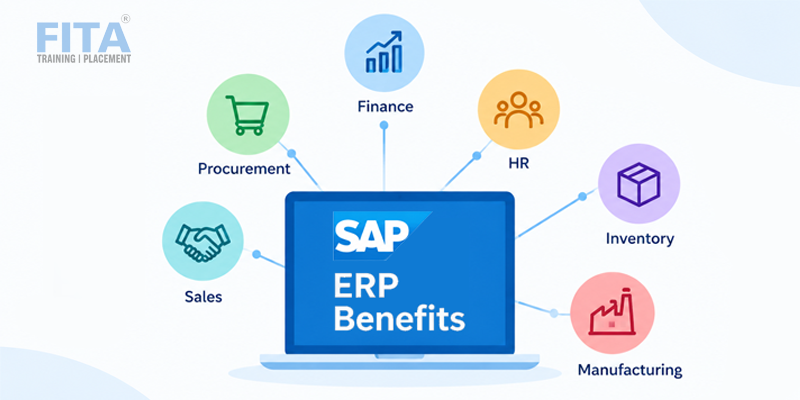
Businesses manage finance, sales, inventory, purchasing, employees, and customer orders every day. When these activities are handled through separate systems, keeping information consistent across departments can become difficult. ERP by SAP brings these business functions together through an integrated enterprise resource planning system.
If you are researching this for the first time, the number of SAP terms can feel confusing. This guide explains in simple terms what SAP ERP software is, how it works, its main modules, key features, benefits, products, and the skills needed to learn it.
What Is SAP ERP Software?
SAP ERP is an enterprise resource planning system developed by SAP that helps organizations manage and integrate essential business processes through a centralized platform.
Better use of this data also depends on understanding how analytics turns business information into useful insights. Explore these Essential techniques of Data Analytics for Business Success to learn more.
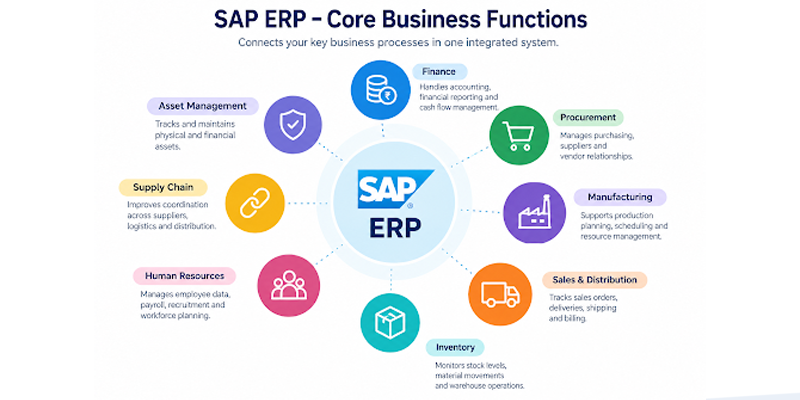
The software ERP SAP approach connects functions such as finance, procurement, manufacturing, inventory, sales, supply chain, and human resources. Instead of maintaining completely separate systems for every department, businesses can work with connected processes and shared information.
For example, when a customer places an order, the information can be connected with inventory availability, delivery, billing, and financial records. This helps different teams work with related business information without repeatedly entering the same data.
SAP has developed several generations of ERP products. SAP S/4HANA is its modern ERP platform, designed to support integrated processes, real-time data processing, analytics, and modern deployment options.
Go from beginner to job-ready with our SAP FICO Training
Enrol NowWhat Does SAP ERP Do?
SAP ERP helps organizations manage and coordinate major business processes through an integrated system. The functions available depend on the SAP products and modules implemented by the organization.
Common activities supported by SAP ERP include:
- Financial accounting and reporting
- Purchasing and procurement
- Inventory management
- Sales and order processing
- Production planning
- Supply chain management
- Human resource management
- Asset management
- Business reporting and analytics
For example, a manufacturing company can connect procurement, inventory, production, and finance. When materials are purchased, inventory information can be updated for relevant teams. Production planners can use that information to plan manufacturing, while finance teams can track associated costs.
This integration gives departments a more connected view of business operations.
Why Do Businesses Use SAP ERP?
Businesses use SAP ERP to integrate processes, organize information, automate repetitive activities, and improve visibility across departments.
One important benefit is data integration. When departments work with connected information, employees can access relevant business data without depending entirely on manually prepared reports from other teams.
SAP ERP can also support process automation. Activities such as purchase processing, invoice management, inventory updates, financial postings, and approvals can be handled through configured workflows and system processes.
Another benefit is improved business visibility. Managers can use information from different functions to monitor operations, identify issues, and support planning.
What Are the Main Modules in SAP ERP?
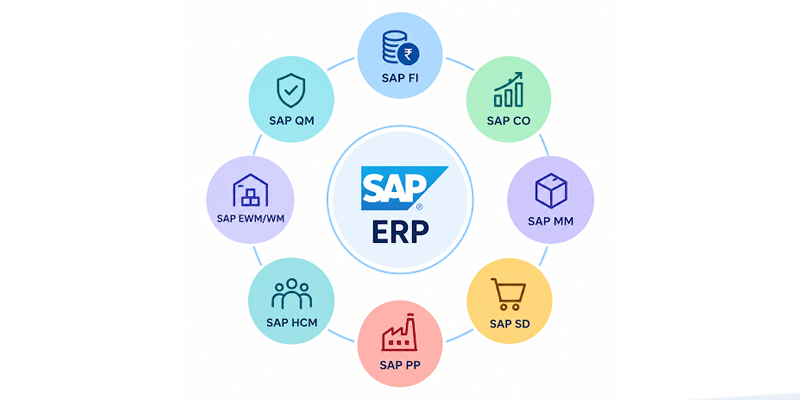
SAP ERP includes different functional areas, commonly called modules. Organizations select and configure modules according to their business requirements.
SAP Financial Accounting
SAP FI, or Financial Accounting, supports activities such as general ledger accounting, accounts payable, accounts receivable, asset accounting, and financial reporting.
It helps finance teams record transactions, manage financial information, and prepare reports required for business operations.
SAP Controlling
SAP CO, or Controlling, focuses on internal management accounting and cost-related information. It can help organizations analyze costs, profitability, budgets, and internal performance.
SAP Materials Management
SAP MM, or Materials Management, supports procurement and inventory-related processes. It can be used for purchasing, material management, goods movements, and inventory monitoring.
SAP Sales and Distribution
SAP SD, or Sales and Distribution, supports sales-related activities such as sales orders, deliveries, shipping, and billing.
By connecting sales information with inventory and finance, organizations can coordinate customer orders with other operational activities.
SAP Production Planning
SAP PP, or Production Planning, supports manufacturing processes. It helps organizations plan production, manage material requirements, and coordinate manufacturing activities.
SAP Human Capital Management
SAP HCM supports employee and workforce-related processes. Depending on the SAP solution being used, organizations can manage employee information, payroll, recruitment, learning, and other HR activities.
Modern SAP environments may also use SAP SuccessFactors for cloud-based human experience and HR capabilities.
How Does SAP ERP Work?
SAP ERP works by connecting business processes and data within an integrated technology environment. Different departments can use specific applications or modules while sharing information between related processes.
A simple sales transaction shows how this works. A customer order can begin in the sales process. The system can then connect that order with inventory availability, delivery activities, billing, and financial records.
This means information entered during one business process can support other related activities. Employees do not always need to recreate the same information in multiple systems.
The software ERP SAP model can also be configured according to an organization’s processes. Companies can adjust system settings and workflows to support their business requirements rather than rebuilding the entire system from scratch.
Managing an integrated ERP environment also requires reliable IT operations, automation, and deployment practices. Explore these Skills that every DevOps Engineer Should Know to understand the key skills involved.
What Are the Key Features of SAP ERP?
SAP ERP provides several capabilities that help organizations manage connected business operations.
- Real-time data: Helps users work with updated business information.
- Financial management: Supports accounting, reporting, costs, and financial processes.
- Supply chain visibility: Helps organizations monitor materials, inventory, and related activities.
- Manufacturing planning: Supports production planning and material requirements.
- Sales order management: Connects sales orders with delivery, billing, and related processes.
- Analytics: Helps users analyze business information and monitor performance.
- Workflow automation: Supports configured approvals and repetitive business processes.
- Compliance support: Helps organizations maintain structured records and business controls.
- Integration: Connects business functions and can integrate with other enterprise applications.
- Role-based access: Provides users with access relevant to their responsibilities.
For organizations working with large volumes of business information, these capabilities can help connect daily operations with reporting and decision-making.
What Are the Benefits of SAP ERP?
SAP ERP generates valuable business data that can support reporting, forecasting, and decision-making. Professionals who want to strengthen their ability to work with business data can explore the Data Analytics Course in Chennai to develop practical analytics skills. SAP ERP can provide several benefits when it is properly implemented and aligned with business requirements.
Centralized Information
Business information can be managed through an integrated environment, helping departments work with more consistent data.
Process Integration
Finance, procurement, sales, inventory, manufacturing, and other functions can be connected through shared processes.
Automation
Repetitive workflows and transactions can be automated or streamlined, reducing manual administrative work.
Better Reporting
Integrated data can support reports and analysis, helping managers understand operational and financial performance.
Scalability
SAP solutions are used by organizations with different sizes and requirements, allowing businesses to select products and deployment approaches that fit their needs.
Improved Visibility
Decision-makers can access information from multiple business functions, making it easier to monitor operations and identify areas that require attention.
Organizations also need people with the right SAP knowledge to implement, maintain, and use these systems effectively. For those exploring SAP as a career option, a structured SAP Course in Coimbatore can provide a starting point for understanding different modules and business processes.
Go from beginner to job-ready with our SAP ABAP Training
Enquire Now
Where Can SAP ERP Be Deployed?
SAP ERP can be deployed using different approaches depending on an organization’s infrastructure, business requirements, and technology strategy.
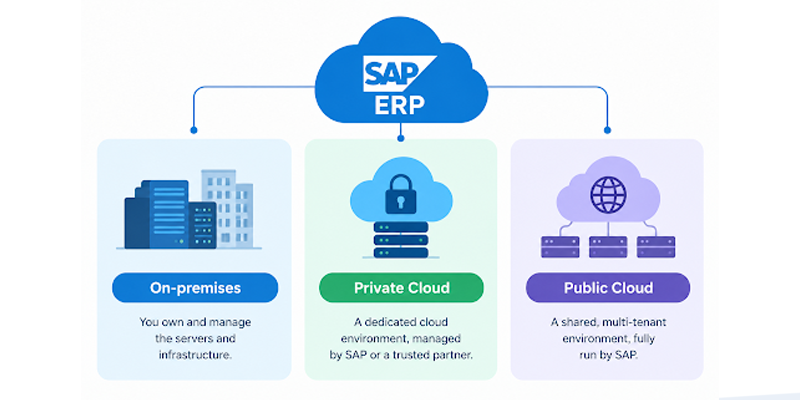
On-Premise
The organization manages the ERP environment and underlying infrastructure within its own IT environment.
Private Cloud
SAP ERP can operate in a dedicated cloud environment while providing cloud-based infrastructure and management options.
Public Cloud
SAP S/4HANA Cloud Public Edition provides a standardized cloud ERP approach with SAP managing the cloud environment and delivering regular updates.
The choice between deployment approaches depends on factors such as customization requirements, infrastructure, security considerations, business processes, and IT strategy.
Cloud environments also require knowledge of modern infrastructure and automation practices. This is where broader technical skills can complement SAP expertise, including DevOps Training in Chennai.
As SAP environments increasingly use cloud infrastructure, understanding different cloud platforms can also help businesses make informed technology decisions. Explore Which Cloud Service Is The Best AWS Or Microsoft Azure? to learn more about the key differences.
What Is SAP S/4HANA?
SAP S/4HANA is SAP’s modern ERP platform. It is designed to support integrated business processes, real-time data processing, analytics, and modern deployment approaches.
S/4HANA is built around the SAP HANA database and is available through cloud and on-premises options.
Its modern capabilities also connect ERP with areas such as analytics, automation, and AI. As organizations modernize their ERP environments, S/4HANA has become an important part of SAP’s current ERP portfolio.
What Are the Main SAP ERP Products?
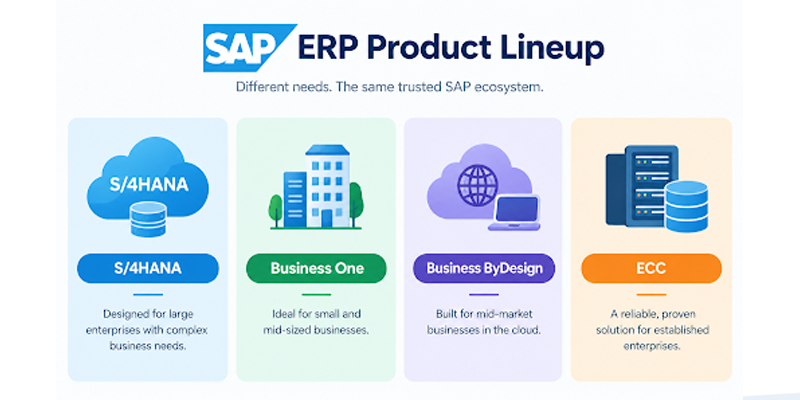
SAP offers different ERP products and platforms for organizations with different business requirements.
SAP S/4HANA
SAP S/4HANA is the modern ERP platform designed for organizations that need integrated business processes, analytics, and modern deployment options.
SAP Business One
SAP Business One is designed primarily for small and mid-sized businesses and supports core functions such as finance, sales, purchasing, inventory, and operations.
SAP Business ByDesign
SAP Business ByDesign is a cloud ERP solution designed for growing and midmarket organizations.
SAP ECC
SAP ERP Central Component, commonly known as ECC, is an earlier generation of SAP ERP software. Many organizations have historically used ECC, while SAP’s current ERP direction is centered on S/4HANA.
Choosing between SAP products depends on factors such as company size, industry requirements, existing infrastructure, deployment preferences, and business processes. Professionals who want structured exposure to SAP modules and platforms can explore a SAP Course in Chennai.
Who Uses SAP ERP?
SAP ERP is used across many industries, including manufacturing, retail, automotive, healthcare, pharmaceuticals, energy, logistics, financial services, and professional services.
Large organizations often use ERP systems to coordinate operations across multiple departments, locations, business units, or countries.
However, SAP also offers products for smaller and mid-sized businesses. The appropriate product depends on company size, business requirements, budget, deployment preferences, and future growth plans.
SAP ERP vs. Standalone Accounting Software
SAP ERP and standalone accounting software serve different purposes.
Accounting software generally focuses on financial activities such as bookkeeping, invoicing, expenses, and financial reporting. SAP ERP can support financial management while also connecting finance with procurement, inventory, sales, manufacturing, supply chain, and other business functions.
This makes ERP suitable for organizations that need broader process integration rather than accounting functionality alone.
The software ERP SAP approach connects finance with other departments so that financial information can be related to operational activities.
SAP ERP vs. Other ERP Systems
SAP ERP is one of several enterprise resource planning platforms available to businesses. Other ERP systems also provide capabilities for finance, procurement, sales, manufacturing, supply chain, analytics, and related functions.
The choice of ERP depends on factors such as company size, industry requirements, existing technology, integration needs, deployment preferences, customization, and budget.
Since many ERP environments now use cloud infrastructure, IT professionals evaluating or supporting these systems can also benefit from broader cloud knowledge through Cloud Computing Training in Chennai.
What Skills Are Needed to Learn SAP ERP?
People interested in SAP careers can develop both functional and technical knowledge. The skills required depend on the SAP specialization they choose.
Functional professionals may work with areas such as accounting, procurement, sales, supply chain, manufacturing, or human resources. Technical professionals may focus on development, integration, databases, security, administration, or system architecture.
A good starting point is to understand ERP concepts, business workflows, data management, problem-solving, and one specific SAP module. Practical exposure to business scenarios can also help learners understand how SAP processes relate to real organizational requirements.
Is SAP ERP Difficult to Learn?
SAP ERP can seem complex because it covers many business processes and technologies. However, beginners can make the learning process easier by starting with basic ERP concepts and focusing on one module or specialization at a time.
Hands-on exercises, case studies, and practical scenarios can help learners understand how transactions move through an integrated ERP environment. As their understanding develops, they can gradually explore more advanced SAP areas.
What Is the Future of SAP ERP?
The future of SAP ERP is closely connected with cloud computing, automation, artificial intelligence, analytics, and integrated business processes.
Modern SAP Cloud ERP offerings increasingly combine business applications with embedded AI, automation, analytics, and connected data. As organizations modernize their ERP environments, professionals who understand both business processes and modern SAP technologies can work across areas such as implementation, consulting, development, administration, analytics, integration, and support.
This also means that learning SAP is no longer limited to understanding individual transactions. Understanding how ERP connects with cloud platforms, data analytics, automation, integration, and AI can provide a strong foundation for professionals exploring SAP as a technology or career path.
Go from beginner to job-ready with our SAP MM Training
Enrol Now
